
Readiness dashboard
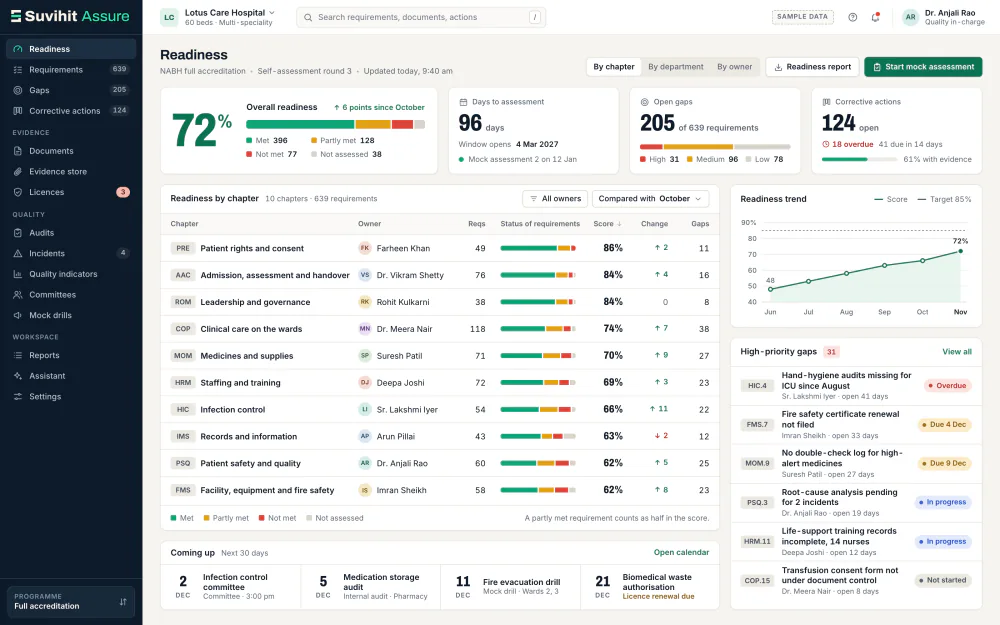
One screen shows how ready the hospital is, chapter by chapter, and what is still open.
- Overall readiness score and chapter scores
- Open gaps grouped by priority
- Days left to your assessment date

NABH readiness and quality management
Assure turns NABH preparation into daily managed work. Requirements, corrective actions, controlled documents, audits, incidents and indicators sit in one place, for less than a consultant's retainer.
Screens are illustrative and show sample data.
The problem
The gap list sits in a spreadsheet. Nobody is named against each item, so the same gaps appear at the next review.
The consent policy exists as a signed print, a Word file and an older copy still pinned at the nursing station.
Before every assessment the team spends evenings collecting registers, drill reports and committee minutes that should already be filed against each requirement.
The consultant comes twice a month. Between visits, corrective actions wait, a licence renewal slips and incidents go unrecorded.
Why now
CGHS package rates are 15% lower for hospitals without NABH or NABL accreditation, under rates revised from 13 October 2025.
Source: CGHS rate circular (opens in a new tab) · 13 Oct 2025
PM-JAY pays 10% more to hospitals with entry-level certification and 15% more to accredited hospitals.
Source: NABH, AB PM-JAY quality certification page (opens in a new tab) · Read 28 Nov 2026
The NABH hospital standard in force from 1 January 2025, the 6th edition, has 639 objective elements in 10 chapters.
Source: NABH Hospital Accreditation Standard, 6th edition (opens in a new tab) · 1 Jan 2025
Assure
Assure lists every requirement of your programme, scores where you stand and turns each gap into a corrective action with an owner, a due date and evidence. Policies, audits, incidents, drills, committees and indicators run in one place, so evidence is filed as work happens.
A readiness score for the hospital and for each chapter, open gaps by priority, and the days left to assessment.
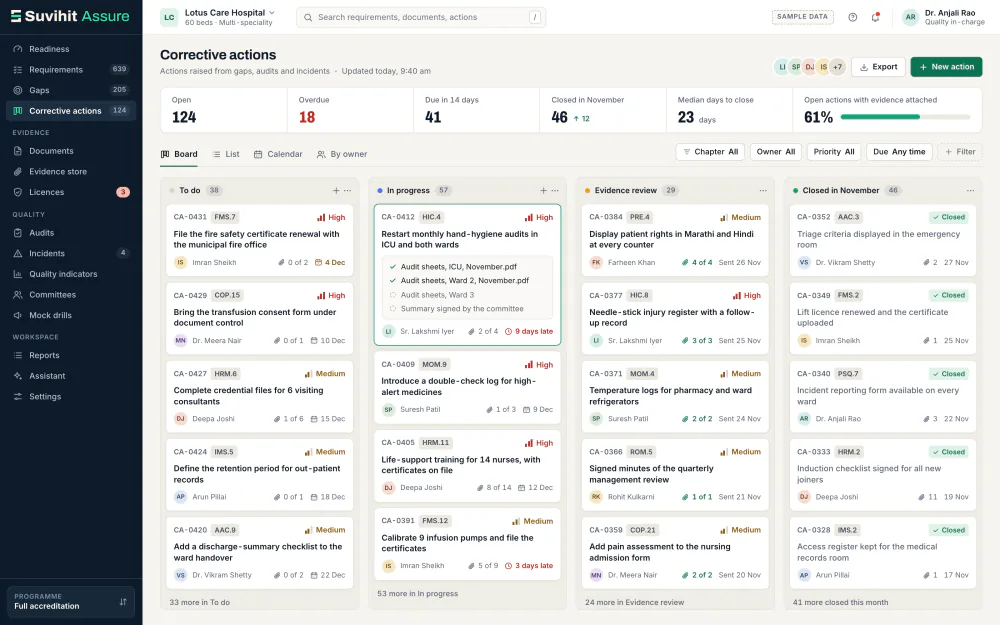
Every gap becomes a corrective action with a named person, a due date, attached evidence and a status everyone can see.
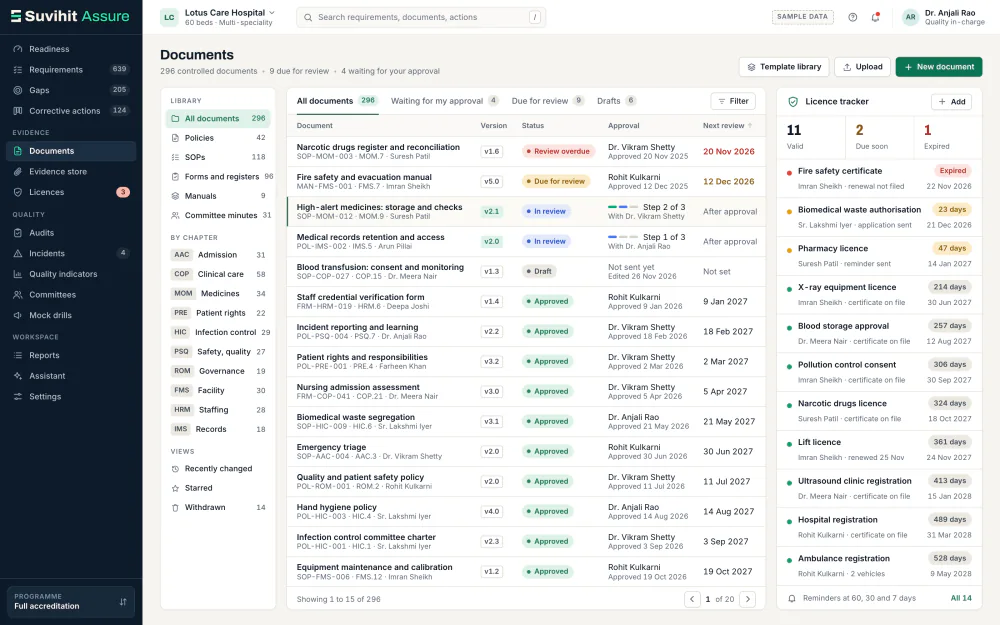
Policies and SOPs carry version numbers, approvals and review dates. Old copies are archived, and licences are tracked to their renewal dates.
One screen shows how ready the hospital is, chapter by chapter, and what is still open.
Every gap is a card with a named owner, a due date, evidence and a status.
The policy and SOP library shows the current version, who approved it and when review is due.
Screens are illustrative and show sample data.
Comparison
| Capability | Free templates and spreadsheets | Consultant alone | Basic checklist app | Suvihit Assure |
|---|---|---|---|---|
| Requirement checklists and sample policies | Yes | Yes | Yes | Yes |
| Live readiness score by chapter | No | Partly | Yes | Yes |
| Corrective actions with owners, dates | Partly | Partly | Partly | Yes |
| Document versions and approvals | No | Partly | No | Yes |
| Incident reporting by staff | Partly | No | No | Yes |
| Multi-hospital view for consultants | No | Partly | No | Yes |
| On-site expert advice | No | Yes | No | No |
Our own assessment of typical ways of working; individual consultants and tools differ. Assure is designed to work alongside a consultant.
Pricing
₹50,000 per facility per year, plus GST. Unlimited users.
₹50,000per facility per year, plus GST
For one hospital preparing for NABH or maintaining its status.
₹40,000per facility per year, plus GST
For three or more facilities under one management.
No chargefor the multi-hospital view
For NABH consultants, with a referral share on each hospital you bring.
Prices are per facility per year, plus GST. The Group price applies to three or more facilities. Consultant partners pay nothing for the multi-hospital view.
One consultancy's published fee card lists ₹3 lakh, one-time, for an entry-level engagement at a hospital of up to 50 beds in a tier-1 city. Assure is ₹50,000 per facility per year, plus GST.
Source: Ichelon Consulting Group, published fee card (opens in a new tab) · Read 28 Nov 2026
Getting started
Day 1
We create your hospital, choose your programme and add your departments and users in one call.
Week 1
Department heads score their requirements. You see your first readiness score and ranked gap list.
Week 2
Gaps become corrective actions with owners and dates. Existing policies are uploaded into document control.
Every month
Management reviews the score, overdue actions, incidents and indicators from one report.
Set-up takes about a quarter of a working day, done remotely. No hardware to buy, nothing to install.
Your hospital's documents and records are stored on servers in India.
Data is encrypted in transit and at rest.
Department heads see their own requirements. The quality in-charge and owner see everything.
Every change to a document, score or action is logged with user and time.
Backups run daily. Your data is exported to you on request.
Planned. Not available yet.
No. Suvihit is an independent software provider and is not affiliated with or endorsed by NABH or the Quality Council of India. Assure helps your team organise the preparation. The assessment and the decision rest with NABH.
No software can promise that. Accreditation depends on what your hospital does every day. Assure makes the work visible: what is done, what is open, who owns it and where the evidence is.
Entry-level certification and full accreditation, for small healthcare organisations and for hospitals. You choose your programme at set-up and can switch later, for example when you move from entry level to full accreditation. All programmes are included in the one fee.
No. The standards are NABH's own publication, and you should hold your own copy. Assure lists each requirement by its code and adds our plain-language guidance, sample templates and a place to record your evidence.
Very little. Assure holds your policies, licences, audit findings, committee minutes and staff names. Incident reports can be recorded without identifying the patient. It is not a patient-record system.
The work continues. Indicators are reported every month, audits and drills follow a calendar, documents come up for review and licences need renewal. Assure keeps that cycle running, so the next assessment is not a fresh start.
Book a 20-minute demo
This page sets no cookies of its own and loads no analytics or advertising trackers. It is hosted on Cloudflare Pages.
The form does not store your details on this website. Pressing the button opens your own email app with your details in a draft to agnivivid.digital@gmail.com. Nothing is sent until you send that email.
If you email, call or message us, Suvihit uses your details only to arrange and follow up a demo of Suvihit Assure. The WhatsApp link opens WhatsApp, which has its own privacy terms.
To have your details corrected or deleted, write to agnivivid.digital@gmail.com.