
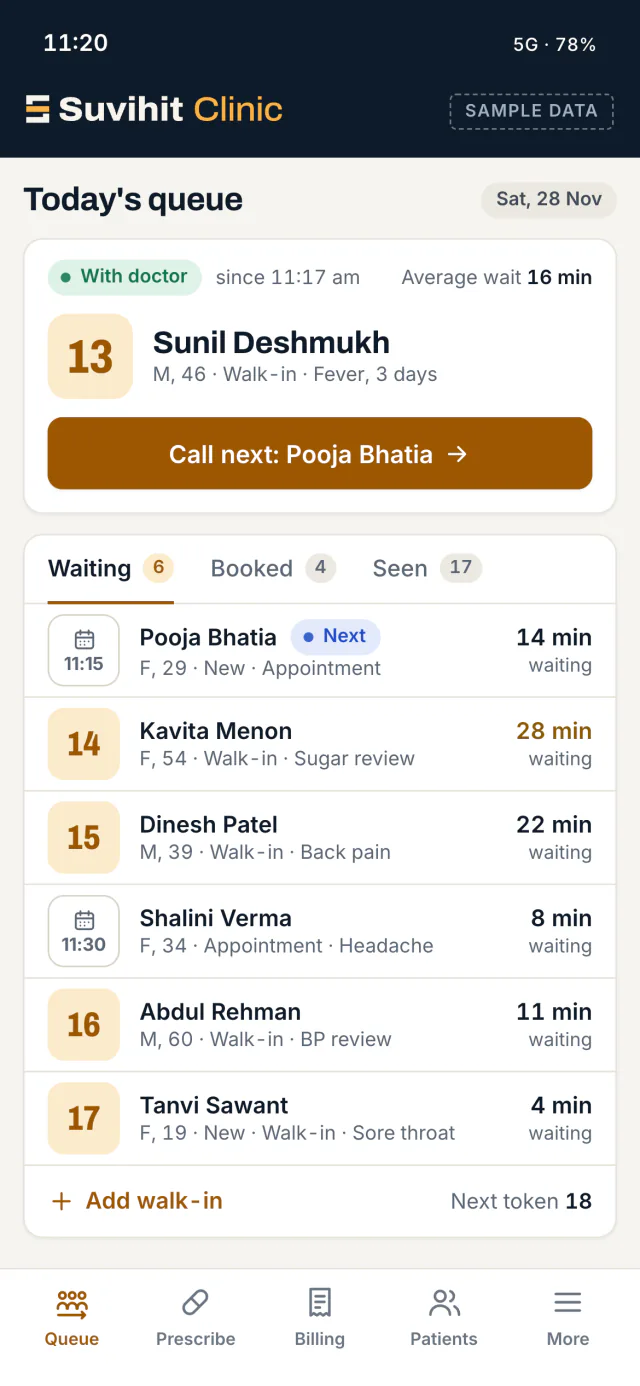
Today's queue
The waiting room on one screen: token numbers, booked appointments and how long each patient has waited.
- Tokens for walk-in patients
- Appointments shown in the same list
- Waiting time beside every name


Appointments, prescriptions and billing app
Prescriptions from your own templates, a token queue, billing and reminders, on the phone you already carry. ₹999 a month per doctor, plus GST.
Screens are illustrative and show sample data.
The problem
Fever, cough, gastritis. You write the same five medicines by hand, with dose and duration, thirty times a day.
The patient has lost the last prescription. You ask what was given, and he says the white tablet.
Walk-ins and appointments mix at the desk. Nobody knows who is next, and the argument reaches your door.
Cash, UPI and pending fees are counted from a notebook after the last patient leaves.
Why now
Electronic record use in Indian hospitals rose from 18% in 2018 to about 35%. No comparable figure exists for clinics.
Source: Bain & Company (opens in a new tab) · 17 Sep 2026
Under the 2002 professional conduct regulations, medical records requested by a patient are to be issued within 72 hours.
Source: Indian Medical Council (Professional Conduct, Etiquette and Ethics) Regulations 2002, reg. 1.3.2 (opens in a new tab) · In force; read 28 Nov 2026
Core duties under India's data protection rules, including notice, consent and security safeguards, take effect around May 2027.
Source: DPDP Rules 2025, PIB note (opens in a new tab) · Rules notified Nov 2025
Clinic
The app replaces the pad, the diary and the fee notebook. Pick a template, adjust the dose, and the prescription prints or goes to the patient's phone. Tokens keep the waiting room in order. Bills and the day's collection are a tap away.
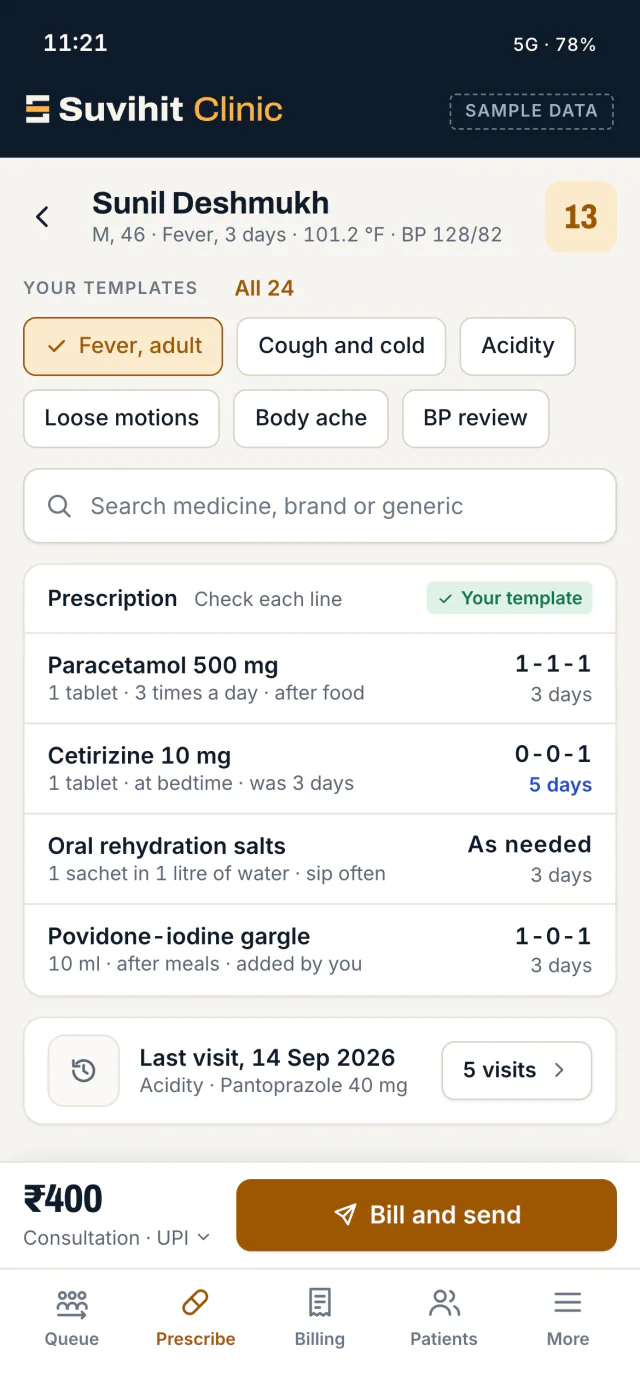
Search a medicine, or pick your own template for a common complaint. Dose, frequency and duration fill in for you to check.
Walk-ins get a token, appointments keep their slot, and your screen shows who is next and how long they have waited.
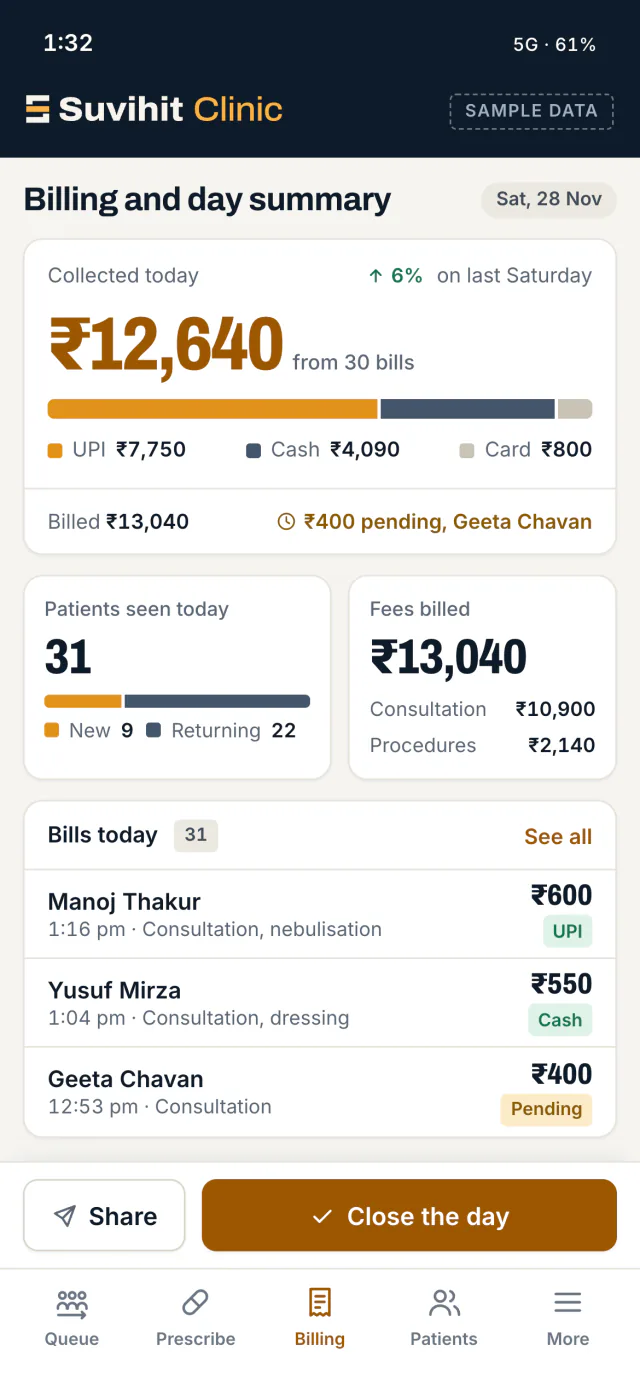
Consultation and procedure fees are billed from the prescription screen. At closing, see patients seen and collections by cash and UPI.
The waiting room on one screen: token numbers, booked appointments and how long each patient has waited.
Search a medicine or pick a template, with the patient's earlier visits beside you.

The fee for each visit and, at closing time, the day's patients and collections.

Screens are illustrative and show sample data.
Comparison
| Capability | Paper pad and diary | Spreadsheet and WhatsApp | Free doctor apps | Suvihit Clinic |
|---|---|---|---|---|
| Reusable prescription templates | No | Partly | Yes | Yes |
| Patient history at the visit | No | Partly | Yes | Yes |
| Token queue with waiting time | No | No | Partly | Yes |
| Billing and day-end summary | Partly | Partly | Partly | Yes |
| Works without internet | Yes | Partly | Partly | Yes |
| Records exported on request | Yes | Yes | Partly | Yes |
| Free to start | Yes | Yes | Yes | No |
Our own assessment of typical ways of working; individual apps differ. Paper still works without power or internet.
Pricing
₹999 per doctor per month, or ₹9,999 a year, plus GST.
₹999per doctor per month, plus GST
Pay month by month.
₹9,999per doctor per year, plus GST
Works out lower than twelve monthly payments.
₹999 per doctor per month or ₹9,999 per doctor per year, plus GST. Two staff logins are included with each doctor.
Getting started
Hour 1
Download the app and add your clinic name, registration number, timings and fees.
Hour 2
On a call, we set up your letterhead and the prescriptions you write most often.
Hour 3
Your receptionist learns tokens, appointments and billing on their own login.
Next OPD
Start with today's patients on the app. Add old records as patients return.
Set-up is remote and takes about half a day. Your next OPD can run on the app.
Patient records are stored on servers in India.
Data is encrypted between your phone and our servers, and at rest.
Your receptionist sees the queue and bills, not clinical notes, unless you allow it.
An edit to a prescription or bill is logged with user and time.
Backups run daily. Your patient data is exported to you on request.
Planned. Not available yet.
Yes. It runs on Android phones and iPhones, and in a web browser on a laptop or desktop. You can use the phone in the consulting room and a laptop at reception.
You keep working. Offline mode lets you add patients, write prescriptions and bill without a connection. Everything syncs when the internet returns. Reminders and teleconsultation need a connection.
Not yet. ABDM integration is on the roadmap. Today the app keeps your records, prescriptions and bills, and gives patients a PDF of each prescription.
Yes. Set your letterhead, registration number, qualifications and clinic timings once. Every prescription prints in that format, or goes to the patient as a PDF. Instructions can be printed in a regional language.
No. You decide every medicine and dose. The app searches the drug list, remembers your templates and prints what you chose. The AI scribe only drafts the visit note from your dictation, for you to review.
Start with today's patients. When an old patient returns, photograph the earlier prescription or report and attach it to the visit. Your regular patients come into the app as they return.
Book a 20-minute demo
This page sets no cookies of its own and loads no analytics or advertising trackers. It is hosted on Cloudflare Pages.
The form does not store your details on this website. Pressing the button opens your own email app with your details in a draft to agnivivid.digital@gmail.com. Nothing is sent until you send that email.
If you email, call or message us, Suvihit uses your details only to arrange and follow up a demo of Suvihit Clinic. The WhatsApp link opens WhatsApp, which has its own privacy terms.
To have your details corrected or deleted, write to agnivivid.digital@gmail.com.