
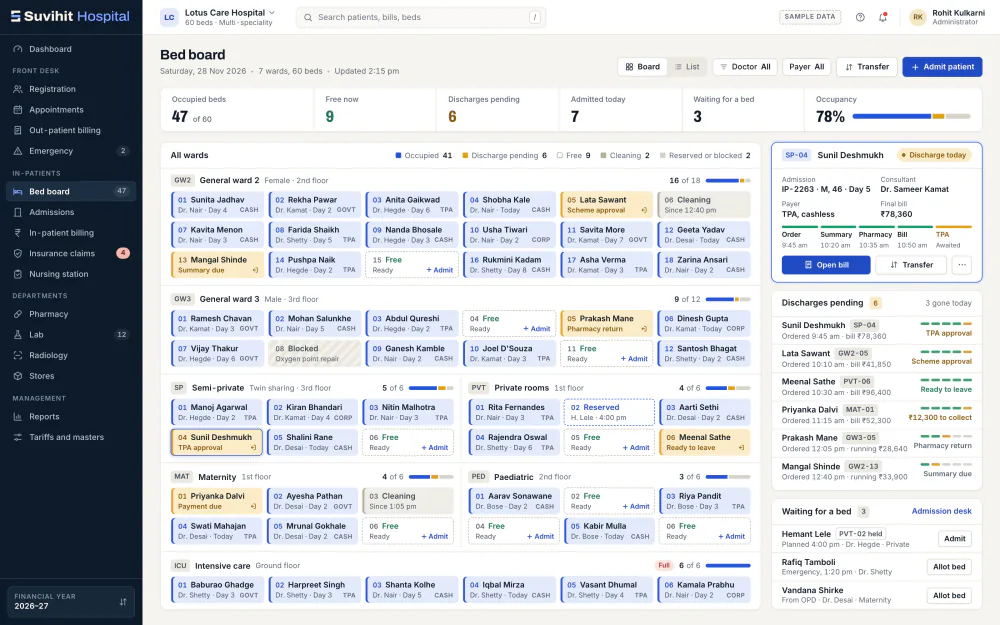
Bed board
Every ward on one screen, with occupied beds, free beds and the discharges still pending.
- Occupied and free beds by ward
- Pending discharges flagged
- Admit or transfer from the board

Hospital information system, 10–100 beds
Registration, billing, beds, pharmacy, lab and discharge in one system. Built for 10 to 100 beds, priced by bed count and set up on site.
Screens are illustrative and show sample data.
The problem
The doctor clears the patient at eleven. The billing clerk then collects pharmacy, lab and ward slips while the family waits.
A night-shift injection, a dressing kit, an extra day in ICU. If the slip is lost, the charge is lost.
Each insurer and scheme has its own rate list. The bill is re-typed against a photocopy, and queries follow.
Occupancy, collections and pending discharges reach you by phone call at night, or at month end from the accountant.
Why now
In a survey of 2,000 hospital software decision-makers, 81% had digitised billing but 42% had digitised clinical notes.
Source: Ken Research survey (opens in a new tab) · Q1 2026 survey, published 31 Jul 2026
Electronic medical record use in Indian hospitals rose from 18% in 2018 to about 35%, concentrated in large urban chains.
Source: Bain & Company (opens in a new tab) · 17 Sep 2026
Hospitals under 200 beds deliver 60% of healthcare services in India and hold over 90% of beds.
Source: "Hospitals for Bharat" report, LoEstro Advisors and Medium Healthcare, via ThePrint (opens in a new tab) · 23 Nov 2024
Hospital
The system links the front desk, wards, pharmacy and lab. A charge raised anywhere lands on the patient's bill at once, at the right insurer or package rate. The bed board shows who is where. Management sees revenue, occupancy and collections each day.
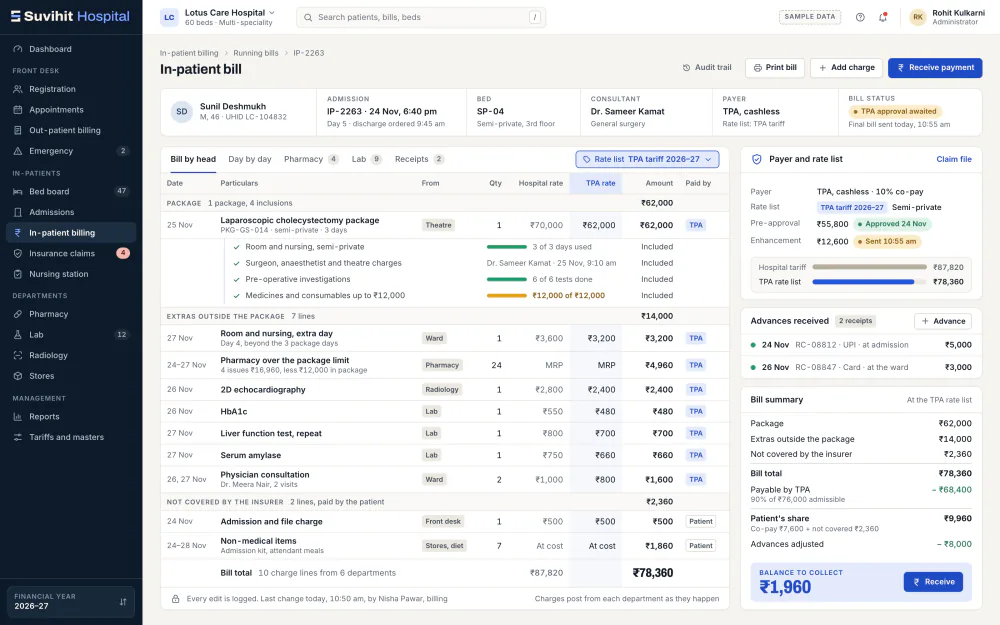
Pharmacy issues, lab tests, procedures and bed charges post to the in-patient bill as they happen, against package, advance and insurer rates.
Every ward and bed on one board: who is in it, which are free, and which discharges are still pending.
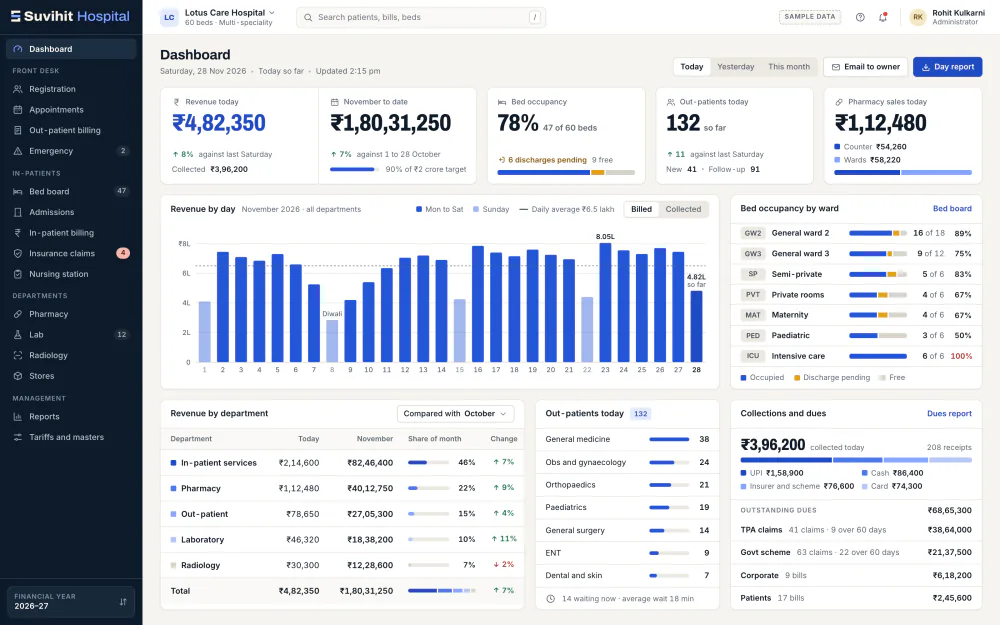
Revenue, occupancy, out-patient count and pharmacy sales for the day and the month, without waiting for the accountant.
Every ward on one screen, with occupied beds, free beds and the discharges still pending.
One bill for the stay: package, advances paid, pharmacy and lab charges, at the insurer's rates.
The owner's view of the day: revenue, occupancy, out-patient count and pharmacy sales.
Screens are illustrative and show sample data.
Comparison
| Capability | Registers and spreadsheets | Separate billing and pharmacy software | Large-hospital system | Suvihit Hospital |
|---|---|---|---|---|
| Out-patient and in-patient billing | Partly | Yes | Yes | Yes |
| Pharmacy charges on patient bill | No | Partly | Yes | Yes |
| Live bed board | No | No | Yes | Yes |
| Insurer and package rate lists | Partly | Partly | Yes | Yes |
| Owner's daily dashboard | No | Partly | Yes | Yes |
| Runs without an IT department | Yes | Partly | No | Yes |
| Low cost to start | Yes | Partly | No | Partly |
Our own assessment of typical ways of working; individual products differ. Set-up is a one-time cost, which is why the last row says Partly.
Pricing
From ₹12,500 a month for up to 25 beds, plus GST.
₹12,500per month, plus GST
Typical set-up: about four days on site for 15 beds.
₹25,000per month, plus GST
Typical set-up: about ten days on site for 50 beds.
₹40,000per month, plus GST
Set-up plan and days agreed after a site visit.
Monthly prices are by bed count, plus GST. One-time on-site set-up, data import and training start at ₹40,000, plus GST, quoted by bed count.
Getting started
Before go-live
Remotely, we build your services, rates, wards, doctors, packages and insurer rate lists with your team.
On site
We import patients, items and opening stock, then train each department at its own counter.
Go-live week
Our person stays through the first live days at reception, billing, pharmacy and the wards.
After go-live
Remote days are kept for month-end reports, corrections and questions from your staff.
About four days on site for a 15-bed hospital and ten for 50 beds, plus remote days.
Patient and billing records are stored on servers in India.
Data is encrypted in transit and at rest.
Reception, billing, pharmacy, lab, nursing and doctors each get their own access.
Every bill edit, discount and cancellation is logged with user and time.
Backups run daily. Your data is exported to you on request.
Planned. Not available yet.
Not yet. ABDM integration is on the roadmap. If your hospital needs ABDM linking today for a government scheme, tell us in the demo so we can be clear about timing before you decide.
It is built for 10 to 100 beds. You can start with registration, billing, beds and pharmacy, and bring lab, nursing or theatre onto the system when your staff are comfortable. The plan for up to 25 beds is ₹12,500 a month, plus GST.
Yes. Each insurer, scheme or corporate client has its own tariff. Choose the payer at admission and the bill is priced on that list. Packages, exclusions, advances and pre-approval status sit on the same bill.
Set-up is a one-time fee from ₹40,000, plus GST, quoted by bed count. It covers building your tariffs and masters, importing patients, items and opening stock, and training each department on site.
No server. It runs in a browser on the computers you have, with data hosted in India. You need a steady internet connection and printers at the counters. We handle updates and backups.
No. It records orders, notes, results and bills, and shows them to the right people. It does not diagnose, calculate doses or check drug interactions. Clinical decisions stay with your doctors.
Book a 20-minute demo
This page sets no cookies of its own and loads no analytics or advertising trackers. It is hosted on Cloudflare Pages.
The form does not store your details on this website. Pressing the button opens your own email app with your details in a draft to agnivivid.digital@gmail.com. Nothing is sent until you send that email.
If you email, call or message us, Suvihit uses your details only to arrange and follow up a demo of Suvihit Hospital. The WhatsApp link opens WhatsApp, which has its own privacy terms.
To have your details corrected or deleted, write to agnivivid.digital@gmail.com.