
Hospital home
Today's admissions, occupancy and collections beside the hospital's NABH readiness score.
- Today's operations at a glance
- NABH readiness score alongside
- One login for both
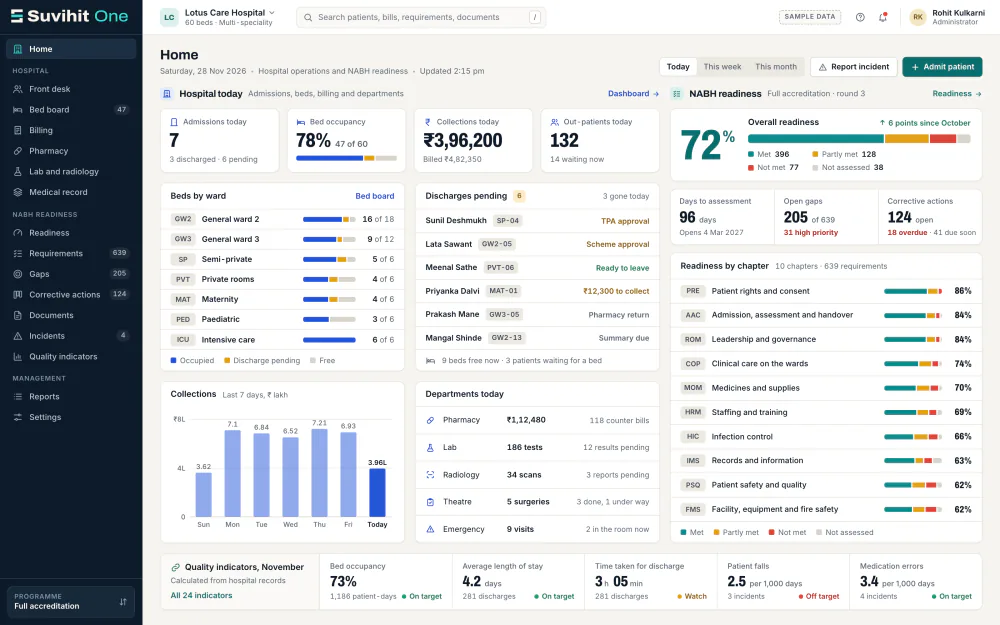

Hospital operations and NABH readiness
Hospital operations and NABH readiness on one platform. Begin with readiness, add billing, beds, pharmacy and lab later, and daily records feed your quality indicators.
Screens are illustrative and show sample data.
The problem
At month end the quality coordinator counts admissions, falls and delayed discharges from registers to fill the indicator sheet.
Billing has the admissions. The quality file needs them again. Nobody has time, so the numbers are estimated.
The assessor asks how the discharge-time figure was reached. The answer is a spreadsheet and somebody's memory.
A hospital system from one company and a compliance tool from another, with your staff as the link between them.
Why now
CGHS package rates are 15% lower for hospitals without NABH or NABL accreditation, under rates revised from 13 October 2025.
Source: CGHS rate circular (opens in a new tab) · 13 Oct 2025
Madhya Pradesh told empanelled private hospitals in four cities to hold final-level NABH certification by 31 March 2026. 174 of 436 had it.
Source: Medical Buyer, on the state order of 9 Mar 2026 (opens in a new tab) · Order of 9 Mar 2026
In a survey of 2,000 hospital software decision-makers, 81% had digitised billing but 42% had digitised clinical notes.
Source: Ken Research survey (opens in a new tab) · Q1 2026 survey, published 31 Jul 2026
One
Begin with NABH readiness: requirements, corrective actions, document control, audits and incidents. Add hospital operations when you are ready, and the fee you paid is credited. From then on, the day's admissions, discharges and incidents calculate your quality indicators, with the records behind each number.
Assure gives every gap an owner, a due date and evidence. Set-up is remote and takes about a quarter day.
Registration, billing, beds, pharmacy and lab join the same platform, set up on site, with your Assure fee credited.
Quality indicators are calculated from the hospital's own admissions, discharges and incident reports, and each figure opens to its source records.
Stage 1
Start with Assure: requirements, corrective actions, document control, audits and incidents. ₹50,000 a year, plus GST.
Stage 2
Add registration, billing, beds, pharmacy and lab when you are ready. Your Assure fee is credited, and Assure stays included.
Stage 3
Admissions, discharges, pharmacy issues and incidents feed the quality indicators. Each figure opens to the records behind it.
Today's admissions, occupancy and collections beside the hospital's NABH readiness score.
Monthly indicators worked out from the hospital's own admissions, discharges and incident reports.
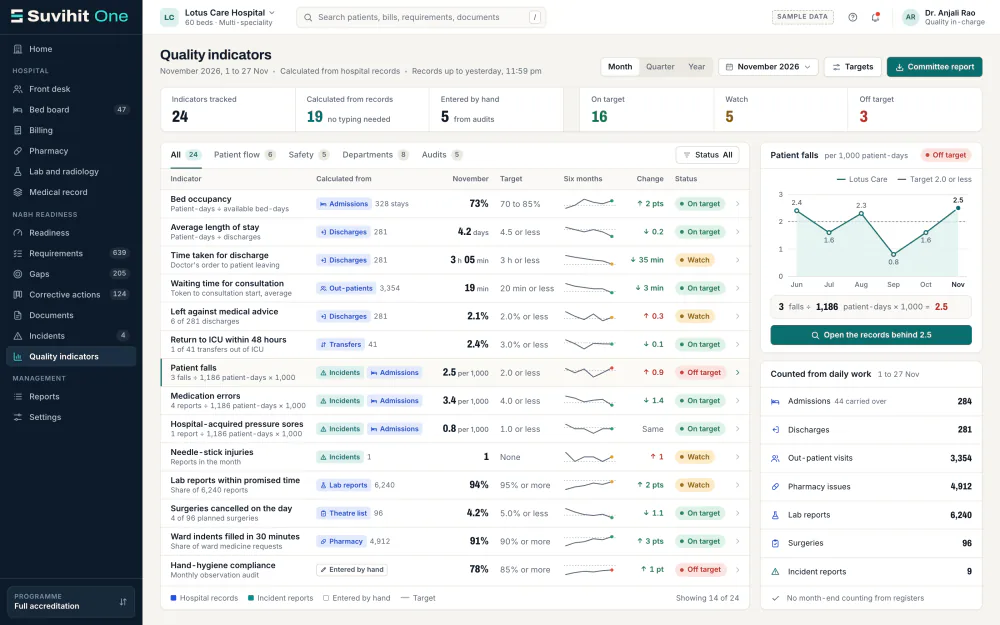
Click a figure to see the admissions and incidents it was calculated from.
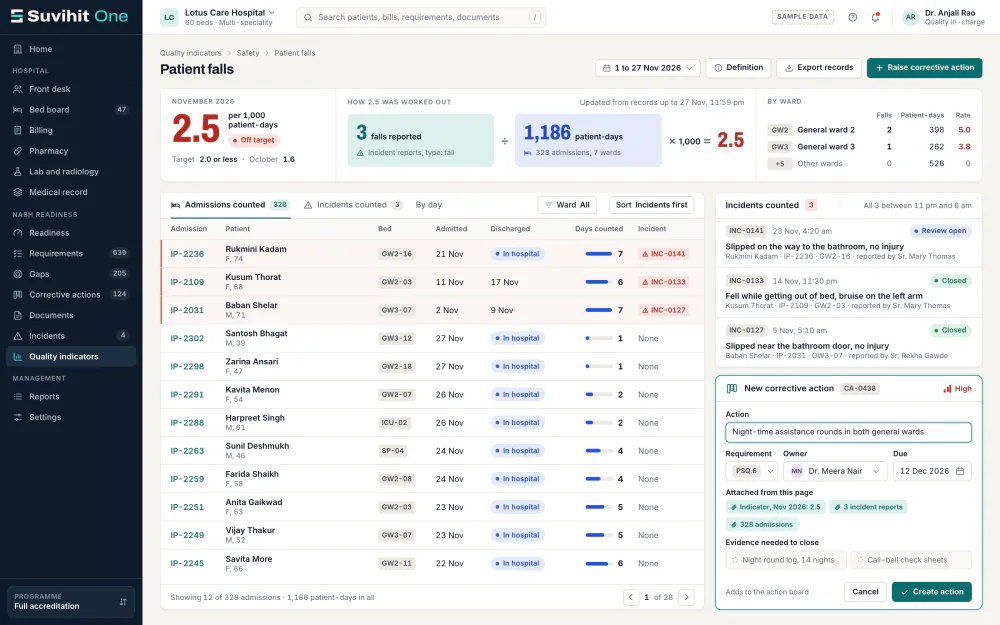
Screens are illustrative and show sample data.
Comparison
| Capability | Registers and a consultant | Separate hospital and compliance software | Hospital software alone | Suvihit One |
|---|---|---|---|---|
| Billing, beds, pharmacy and lab | Partly | Yes | Yes | Yes |
| NABH requirement and gap tracking | Partly | Yes | No | Yes |
| Corrective actions with owners | Partly | Yes | No | Yes |
| Indicators calculated from daily records | No | No | Partly | Yes |
| Drill from indicator to records | No | No | Partly | Yes |
| One login and one bill | No | No | Yes | Yes |
| On-site expert advice | Yes | No | No | No |
Our own assessment of typical ways of working; individual consultants and products differ.
Pricing
Start at ₹50,000 a year, plus GST. Credited when you add operations.
₹50,000per facility per year, plus GST
NABH readiness alone. The fee is credited when you add hospital modules.
₹12,500per month, plus GST
Hospital modules, with Assure included at no extra charge.
₹25,000per month, plus GST
Hospital modules, with Assure included at no extra charge.
₹40,000per month, plus GST
Hospital modules, with Assure included at no extra charge.
Hospital plans are by bed count, with Assure included. Assure alone is ₹50,000 per facility per year, credited when you add hospital modules. Set-up from ₹40,000. All prices plus GST.
Getting started
Day 1
A remote call of about a quarter day: your programme, departments and users.
Weeks 1 to 2
Departments score their requirements. Gaps become corrective actions with owners and dates.
When you are ready
We build tariffs, import patients, items and stock, and train each department at your hospital.
After go-live
Indicators begin to calculate from daily records in place of manual entry.
Assure: about a quarter day, remote. Hospital modules: about four to ten days on site, depending on bed count.
Hospital, patient and quality records are stored on servers in India.
Data is encrypted in transit and at rest.
A single login per person, with access set by role across both sides.
Bill edits, document approvals and score changes are logged with user and time.
Backups run daily. Your data is exported to you on request.
Planned. Not available yet.
Yes. Start on Assure at ₹50,000 per facility per year, plus GST. When you add hospital modules, that fee is credited and Assure stays included in your bed-count plan at no extra charge.
Each indicator has a definition: what is counted and over what period. Once admissions, discharges, pharmacy issues and incidents are recorded on the platform, the count comes from those records. You can open any figure and see the entries behind it.
Not yet. ABDM integration is on the roadmap. If ABDM linking is a condition for your scheme work today, raise it in the demo so we can be clear about timing before you decide.
No. Suvihit is an independent software provider and is not affiliated with or endorsed by NABH or the Quality Council of India. The platform helps your team organise the work. The assessment and the decision rest with NABH.
No. Departments can come on one at a time, for example registration, billing and beds first, then pharmacy and lab. Indicators that depend on a department switch from manual entry to calculated once that department is live.
One vendor, one contract, one monthly invoice by bed count, with NABH readiness included. One support contact for a billing question and for a document-control question. One login for each member of staff.
Book a 20-minute demo
This page sets no cookies of its own and loads no analytics or advertising trackers. It is hosted on Cloudflare Pages.
The form does not store your details on this website. Pressing the button opens your own email app with your details in a draft to agnivivid.digital@gmail.com. Nothing is sent until you send that email.
If you email, call or message us, Suvihit uses your details only to arrange and follow up a demo of Suvihit One. The WhatsApp link opens WhatsApp, which has its own privacy terms.
To have your details corrected or deleted, write to agnivivid.digital@gmail.com.